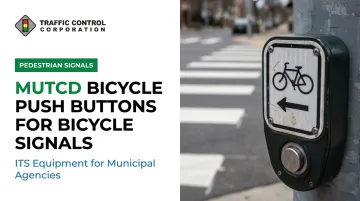
Many agencies and contractors still design and specify these buttons based on MUTCD 2009 Section 9B.11, a provision that no longer exists in that form. The current standard is 2023 MUTCD Section 4H.12, and the differences matter for signage, placement, and accessibility.
This article breaks down what the current MUTCD requires, which signs must accompany a bicycle push button, where and how to place them, and why getting this right protects both cyclist safety and federal-aid funding eligibility.
Key Takeaways
- Bicycle push buttons now fall under MUTCD Section 4H.12 (2023), replacing 2009 Section 9B.11
- Placement must allow "reasonable reach" for cyclists without forcing a dismount
- Buttons shared with pedestrians must meet Section 4I.05 accessibility requirements
- Every bicycle push button needs a matching regulatory sign: R10-4, R10-24, or R10-26
- Non-compliant installations risk federal-aid funding under 23 CFR 655
What Are Bicycle Push Buttons?
A bicycle push button is a manually operated device that lets a cyclist actuate a bicycle signal or a shared pedestrian-bicycle signal phase. The MUTCD defines a push button broadly as a device "to activate a device or signal timing for pedestrians, bicyclists, or other road users."
Unlike passive detection methods, a push button requires deliberate action. Oregon's official bicycling manual describes the typical experience: a rider approaches a crossing, stops at the button, and presses it.
The cyclist then waits for the green indication before proceeding, much like a pedestrian waiting at a WALK signal, though this one is mounted and positioned for someone still on a bike.
These buttons show up in two main contexts:
- Shared-use path and roadway crossings, where a trail intersects a street
- Dedicated bicycle-signal intersections, where a separate bicycle phase exists alongside vehicle and pedestrian phases
Push buttons also solve a real detection problem. In-pavement loop detectors sometimes miss bicycles entirely if a rider doesn't cross the loop wire at the right angle or if the loop wasn't tuned for a bicycle's smaller electromagnetic mass. A push button gives the cyclist direct control, improving visibility to the signal controller and reducing missed calls compared to relying on automatic detection alone.
MUTCD Section 4H.12: Core Requirements for Bicycle Push Buttons
Section 4H.12 replaced the old sign-focused approach in 2009's Section 9B.11 with four numbered provisions specific to bicycle push buttons. Here's what each one actually requires.
The Four Provisions, Explained
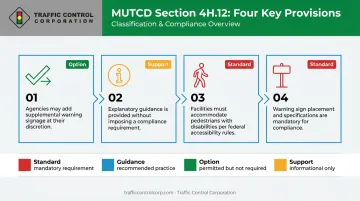
Provision 01 (Option): Bicycle push buttons may be used for bicycle detection. This is permissive language, not a mandate. Agencies remain free to specify in-pavement loop detectors, video detection, or radar instead, or alongside push buttons as a backup.
Provision 02 (Support): Where a button serves only bicyclists, its location is "determined by engineering judgment considering a reasonable reach without requiring most bicyclists to dismount." The MUTCD doesn't hand engineers a fixed number here.
State DOT bikeway design manuals typically translate this guidance into practical mounting heights and lateral offsets from the bikeway edge, letting a seated rider reach the button without putting a foot down.
Provision 03 (Standard): Where a button serves both pedestrians and bicyclists, it must meet all accessibility requirements referenced in Section 4I.05. That means operable force limits, an accessible clear-ground-space approach, and a mounting position within the accessible reach range, not just "close enough" for a cyclist.
Provision 04 (Standard): Every bicycle push button must be paired with an appropriate regulatory sign: R10-4, R10-24, or R10-26. This requirement has no exceptions.
If your compliance documents still cite Section 9B.11, they're referencing a provision titled "Bicycle Regulatory Signs" in the 2009 edition, not the current bicycle push button framework. Update specifications, plan notes, and standard drawings to reference Section 4H.12 directly.
Reading MUTCD's Classification Language
MUTCD provisions fall into four categories, and knowing which applies changes how strictly you must follow it:
| Classification | Meaning | Typical Verb |
|---|---|---|
| Standard | Mandatory practice | "shall" |
| Guidance | Recommended practice | "should" |
| Option | Permissive, no requirement | "may" |
| Support | Informational only | — |
Provisions 03 and 04 are Standards. Provision 02 is Support, meaning engineering judgment governs the specifics. Provision 01 is an Option, confirming push buttons are one tool among several.
Required Regulatory Signage for Bicycle Push Buttons
Signage isn't a nice-to-have. Provision 04 makes it a Standard requirement anytime a bicycle push button is installed.
R10-4: Push Button for Green Light
This sign applies where pedestrian signal indications also control bicyclist crossings. The minimum size is 9 x 12 inches. It's the sign you'll see most often on shared-use path crossings where bikes and pedestrians share the same signal phase.
R10-24 and R10-26: Bike Push Button for Green Light
These signs apply where bicyclists are not intended to follow pedestrian signal indications, meaning the bicycle gets its own dedicated phase. R10-26 includes an arrow variant for bicycle-specific turning movements. Both carry a minimum size of 9 x 15 inches.
Quick reference for related signs:
| Sign | Purpose | Minimum Size |
|---|---|---|
| R10-4 | Push button controls pedestrian phase shared with bikes | 9 x 12 in |
| R10-24 | Push button for dedicated bike signal | 9 x 15 in |
| R10-26 | Push button for bike signal with turn arrow | 9 x 15 in |
| R9-5 | Directs cyclists to use pedestrian signal (no button) | 12 x 18 in |
| R10-22 | Marks pavement location for automatic bicycle detection | 12 x 18 in |
Note that R9-5 and R10-22 serve different purposes entirely. R9-5 tells cyclists to follow the pedestrian signal without a button at all. R10-22 marks where to position a bike on pavement for automatic detection, not manual actuation. Don't substitute one for another.
Uniformity matters just as much as selection. Every sign must follow standard shape, legend, and color per MUTCD Part 9, and it must be retroreflective, regardless of which manufacturer produced it.
Placement, Accessibility & Detection Best Practices
Getting the sign right is only half the job. Placement and ongoing maintenance determine whether the installation actually works for the people using it.
Clearance and Mounting
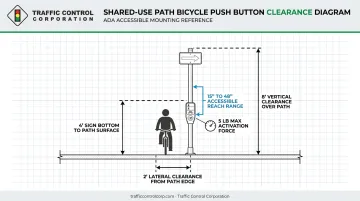
On shared-use paths, signs and their supports need:
- At least 2 feet of lateral clearance from the near path edge
- At least 8 feet of vertical clearance over the path
- A minimum of 4 feet from the sign's bottom edge to the path surface for post-mounted signs
For buttons shared between pedestrians and cyclists, current PROWAG guidance calls for operable parts within a 15-inch to 48-inch vertical reach range. Activation force is capped around 5 pounds, with no tight grasping, pinching, or wrist-twisting required. Exact dimensions shift as guidance updates, so confirm current PROWAG specifications before finalizing a design.
Engineering Judgment Factors
When siting a button, weigh:
- Bikeway type: a shared-use path button sits differently than one for an on-road bike lane
- Curb ramp alignment: the button shouldn't force a rider off the natural travel path
- Sightlines: riders need to see the button without stopping in a conflict zone
- Existing pedestrian actuation: determine whether one button can serve both modes or whether separate buttons make more sense
Push Buttons vs. Passive Detection
Push buttons aren't the only detection option, and many agencies mix approaches. Loop detectors tuned for bicycle mass, video detection, and radar all offer automatic detection without requiring a cyclist to stop and press anything.
TCC supplies both sides of that equation. For agencies leaning toward manual actuation, TCC distributes ADA-compliant pedestrian and cyclist push buttons through PedSafety.
Agencies weighing passive alternatives will find TCC's catalog includes Reno A&E inductive loop detectors configured for bicycle-scale detection. Econolite's Autoscope OptiVu video detection and EPIQ and EVO radar sensors round out the lineup, all capable of classifying bicycles separately from vehicles and pedestrians.
Whichever route an agency chooses, install a maintenance routine. Buttons stick, corrode, or lose calibration over time. Periodic functional and accessibility testing confirms the installation stays compliant well after the ribbon-cutting.
Why MUTCD Compliance Matters for Agencies and Contractors
Non-compliant bicycle signal equipment carries real exposure, not just an abstract paperwork risk.
Federal-aid funding is directly tied to MUTCD conformance. Under 23 CFR 655.603, the FHWA-approved MUTCD is the national standard for traffic-control devices on public streets, highways, and bicycle trails.
Federal-aid projects must bring traffic-control devices into conformance. Agencies are expected to systematically upgrade substandard equipment rather than leave it in place indefinitely.
ADA exposure is separately significant. In 2023, a federal court found the City of Chicago liable under ADA Title II for failing to provide accessible pedestrian signal information to blind pedestrians.
That case centered on accessible pedestrian signals rather than bicycle buttons specifically, but it demonstrates the kind of liability public agencies face when signal actuation and information aren't fully accessible.
Midwest cities are already building out this infrastructure.
Madison, Wisconsin, operates push-activated bicycle signals across its network, instructing riders to press the button and wait for the bicycle indication before proceeding. It's a live example of this exact technology, already running daily across a major Midwest city.
For agencies and contractors navigating specification, installation, or upgrades, TCC has supported traffic control projects across the Midwest for over 75 years.
Across its 11-state service area, the company offers product selection guidance, onsite troubleshooting, and factory-trained technical support. This helps teams specify and install push buttons and signal systems that hold up to MUTCD and ADA scrutiny.
Frequently Asked Questions
What is a pedestrian push button?
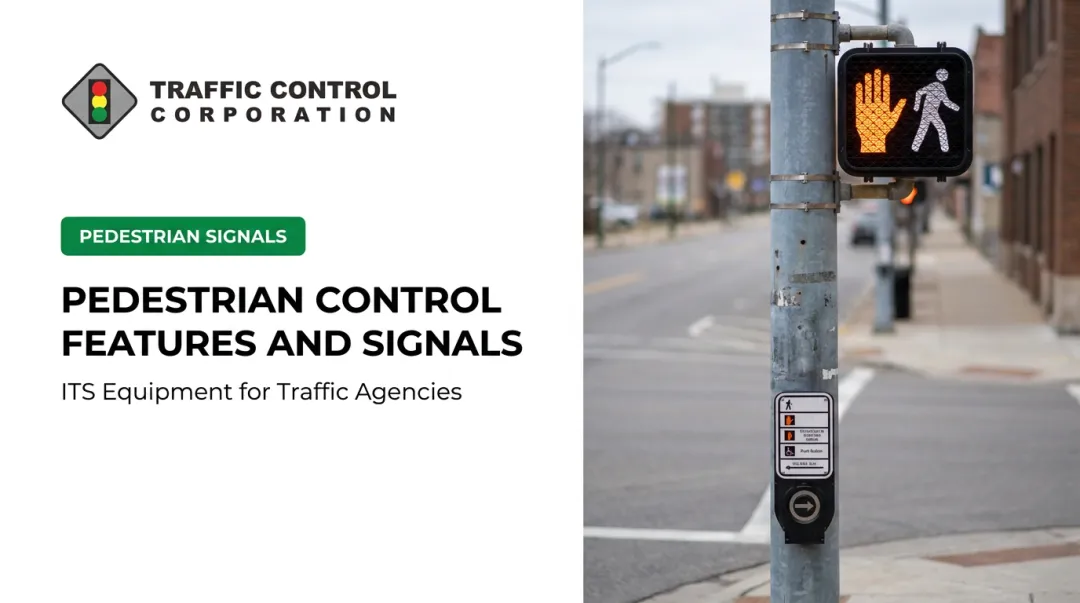
It's a manually operated device that activates a pedestrian WALK phase at a signalized crossing. Unlike a bicycle push button, it's sized and positioned specifically for someone on foot, not someone seated on a bike.
What is the difference between a bicycle push button and a pedestrian push button?
Bicycle buttons require a mounting height and reach that accommodate a seated rider, and they need R10-4, R10-24, or R10-26 signage instead of standard pedestrian signs. When one button serves both modes, it must meet full accessibility requirements.
Which MUTCD section governs bicycle push buttons?
Section 4H.12 of the 2023 MUTCD (11th Edition) governs bicycle push buttons directly. The 2009 edition addressed related signage under Section 9B.11, which used different terminology.
What sign must accompany a bicycle push button?
Provision 04 of Section 4H.12 requires an appropriate regulatory sign: R10-4, R10-24, or R10-26. Which one applies depends on whether the button controls a shared pedestrian phase or a dedicated bicycle signal.
Are bicycle push buttons required at every bicycle signal?
No. Provision 01 makes push buttons an Option, not a mandate. Agencies can instead rely on passive detection like inductive loops, video, or radar, or combine both approaches at the same intersection.
How high should a bicycle push button be mounted for accessibility?
Buttons shared with pedestrians must meet Section 4I.05 accessibility requirements, generally within a defined vertical reach range and limited activation force. Consult current PROWAG specifications for exact height and force figures before finalizing a design.