Introduction
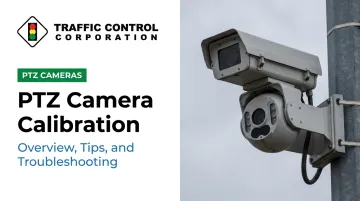
PTZ cameras are essential tools for traffic monitoring across Midwest road networks. Operators rely on them to remotely pan, tilt, and zoom across intersections, confirm incidents, and feed real-time video to traffic management centers.
According to the FHWA, nearly 500,000 cameras have been deployed nationwide by state and local agencies for situational awareness. This highlights just how central video has become to modern traffic operations.
When a PTZ camera falls out of calibration, presets drift, image quality degrades, and the camera can no longer reliably support incident detection or signal management decisions. Missed incidents and slower response times follow.
This article covers what PTZ camera calibration involves and its key components. We also provide a step-by-step process, field tips for Midwest deployments, and common troubleshooting solutions.
Key Takeaways:
- Calibration aligns a PTZ camera's movement, optics, and presets to its specific deployment environment
- Preset drift is the most common field issue — and is often correctable without an on-site visit
- Midwest conditions (freeze-thaw cycles, wind, heavy vehicle vibration) accelerate calibration drift
- Document every calibration setting; it saves significant time after power resets
- Some issues require hands-on service — know when to escalate
What Is PTZ Camera Calibration and Why Does It Matter for Traffic Management?
PTZ camera calibration is the process of configuring and aligning a camera's pan, tilt, zoom, and focus parameters so that its mechanical movement, optical output, and positional presets perform accurately and consistently across a defined monitoring zone.
The operational stakes are concrete. A properly calibrated PTZ camera delivers reliable zoom coverage of an intersection approach, consistent license plate reads, and dependable video feeds to a traffic management center. A miscalibrated one introduces blind spots, unreliable data, and gaps in automated incident detection — often without any obvious warning to the operator.
When Calibration Is Required
Calibration isn't a one-time task at installation. It's needed at several points in a camera's lifecycle:
- Initial installation — factory settings provide a baseline, but field calibration fine-tunes the camera to actual distances, angles, and lighting conditions at each site
- After physical repositioning — any adjustment to the pole, mount, or camera housing requires recalibration
- Firmware or software updates — updated defaults can silently alter operating parameters
- After power surges or resets — stored settings may not survive every power event
- Following seasonal shifts — mounting hardware can shift as temperatures cycle, particularly in Midwest freeze-thaw conditions
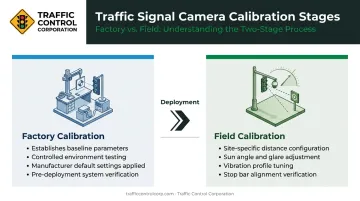
Two distinct calibration stages apply to every deployment. Factory calibration establishes baseline operating parameters in a controlled environment. Field calibration adjusts those parameters to site-specific realities: the exact distances to the stop bar, sun angle during peak hours, and the vibration profile of a high-traffic corridor.
How Calibration Affects ATMS and Video Analytics
PTZ cameras don't operate in isolation. They communicate with advanced traffic management systems (ATMS), video analytics platforms, and signal controllers — and miscalibration affects all of them.
A 2022 ENTERPRISE Transportation Pooled Fund report documents that automated incident detection stops while a PTZ camera is away from its home position and only resumes after it returns. That single finding illustrates why home position accuracy isn't just a camera setting — it's a direct input to downstream analytics reliability.
Key Components of PTZ Camera Calibration
Pan and Tilt Calibration
Pan and tilt calibration sets the camera's mechanical travel limits and confirms that commanded positions correspond to actual physical angles. This prevents the camera from attempting to move beyond its safe range and ensures preset positions point to the intended monitoring zones.
To verify, command the camera to a known bearing — due north along a road corridor, for example — using the controller or management software, then confirm the image matches the expected field of view. Repeat at multiple points across the full pan range.
Pan limits typically span 0 to 360 degrees; tilt limits vary by model and mounting configuration. Setting soft limits that exclude obstacles or irrelevant areas reduces wear on motors and prevents operators from accidentally pointing cameras away from active monitoring zones.
Zoom and Focus Calibration
Zoom calibration ensures each zoom level consistently produces the expected field of view without distortion. In traffic applications — where operators zoom to read signage, identify vehicles, or monitor specific lanes at distance — any inconsistency directly affects operational reliability.
Focus calibration confirms the lens produces a sharp image across the zoom range. Traffic scenes challenge autofocus systems: moving vehicles, mixed light sources, and shifting contrast can all trigger focus hunting. Key considerations:
- Confirm autofocus converges quickly at telephoto zoom levels
- Set near-focus limits to prevent the lens from locking onto objects too close to the camera
- Verify sharp focus at the distances actually used in operations — the stop bar, the far end of an approach lane, the merge zone
Preset Position Accuracy
Presets are stored pan/tilt/zoom coordinates that direct the camera to a specific monitoring location with a single command. Calibration ensures those presets remain accurate and don't drift over time.
Preset drift, where the camera lands slightly off-target after being called to a preset, is the most frequently reported calibration issue in the field. It's typically correctable by resetting the home position and re-saving affected presets. When drift appears, check all three of the following before closing out the service call:
- Preset pan/tilt/zoom coordinates
- Focus-recall zones tied to each preset
- Privacy masks that depend on accurate camera positioning
Step-by-Step PTZ Camera Calibration Process
Pre-Calibration Checklist
Before touching any settings, confirm:
- Camera is firmly secured with no physical play in the mount
- Power supply is stable
- Network or serial communication is established and confirmed
- All firmware is current
A camera on an unstable mount will not hold calibration. Physical stability is the foundation.
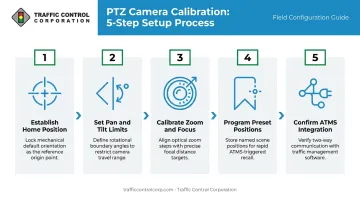
Step 1 – Establish and Verify the Home Position
Command the camera to its home position (typically straight ahead and level) and confirm the image matches the physical alignment of the mount. If the home position is off, correct it before proceeding — either by adjusting the mount physically or using the camera's home position offset setting.
Step 2 – Set Pan and Tilt Limits
Define soft mechanical limits appropriate to the deployment. For a roadway-facing camera, limits should confine pan travel to the active roadway and exclude directions where the camera would face obstacles or exceed its physical range.
Step 3 – Calibrate Zoom and Focus Across the Operating Range
At key distances relevant to the deployment, verify focus performance across the full zoom range:
- Verify sharp focus at the required zoom level for each critical distance
- For manual focus cameras, record optimal focus values at each zoom step
- For autofocus cameras, confirm the system converges accurately without hunting
- Check whether the manufacturer supports scheduled lens initialization routines that run automatically after reboot
Step 4 – Program and Verify Preset Positions
Command the camera to each intended monitoring zone, fine-tune pan, tilt, and zoom to frame the scene correctly, and save the preset. After saving all presets, cycle through each one and confirm the camera returns to the correct position with the expected image framing.
Step 5 – Confirm Integration with the Traffic Management System
Confirm the full integration chain is functioning before closing out the deployment:
- Verify preset calls, PTZ commands, and the video stream are correctly received by the connected ATMS, video wall controller, or signal management platform
- Validate ONVIF Profile S operations (GetPresets, GotoPreset) through the actual ATMS client, not just the camera's web interface
- Test that alarm-triggered camera tours and auto-positioning commands execute as configured
Tips for Accurate and Long-Lasting PTZ Camera Calibration
Document Every Calibration Setting
Maintain a calibration log for each camera that records:
- Preset positions (pan/tilt/zoom values)
- Focus settings at key zoom levels
- Communication protocol details (baud rate, parity, addressing for serial-controlled cameras)
- Date of calibration and technician name
- Firmware version at time of calibration
This log is essential for quick reconfiguration after a power reset and serves as the baseline for troubleshooting. Without it, diagnosing drift often requires starting from scratch.
Account for Environmental Factors in Midwest Deployments
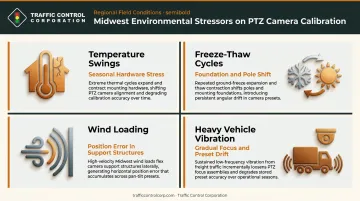
Consistent documentation only goes so far — physical conditions are equally important. PTZ cameras installed on poles or mast arms across the Midwest face conditions that accelerate calibration drift:
- Temperature swings — significant seasonal temperature variation stresses mounting hardware
- Freeze-thaw cycles — MnDOT research documents changing freeze-thaw behavior in Minnesota that affects roadside foundations and pole installations
- Wind loading — WisDOT research confirms that wind-loaded roadside structures experience position error that can originate in the support structure itself, not just the camera
- Heavy vehicle vibration — high-traffic corridors create persistent vibration that gradually shifts focus and preset accuracy
Plan for more frequent calibration checks in high-vibration locations, and remote recalibration doesn't replace physical mount inspection.
Schedule Periodic Recalibration Reviews
Environmental wear makes scheduling non-negotiable. Build a maintenance schedule that includes preset verification checks:
- Following winter freeze-thaw cycles
- After any maintenance work on the pole or mounting hardware
- Whenever operators report image positioning anomalies
- As part of annual or semi-annual maintenance
- Per manufacturer guidance — Axis, for example, recommends annual preventive maintenance covering both mechanical checks and software calibration
Common PTZ Camera Calibration Issues and How to Troubleshoot Them
Preset Drift and Positioning Errors
Preset drift — where the camera's resting position at a preset no longer matches the intended scene — is typically caused by:
- Mechanical wear in pan/tilt motors
- A shifted home position reference
- Controller communication errors
- Physical disturbance to the mount
Troubleshooting steps:
- Reset the home position
- Re-run the pan/tilt limit setup
- Re-save affected presets
- Cycle through all presets to confirm accuracy
If drift recurs quickly after recalibration, inspect the motor assembly for wear and the mount for any looseness or play. A calibration routine that cannot recover home position may indicate a broken pan/tilt mechanism requiring service.
Focus and Zoom Inconsistencies
Soft images at telephoto settings are usually caused by focus calibration drift, a dirty lens, or autofocus hunting under low-contrast or low-light conditions.
Troubleshooting steps:
- Manually test focus at the problematic zoom level
- Clean the lens dome —debris is a frequent culprit
- Check whether the issue is lighting-dependent (autofocus hunting in low contrast)
- Run the camera's built-in focus calibration routine per manufacturer guidance
- Consider configuring focus recall rather than relying on autofocus in challenging traffic scenes
When to Escalate to Professional Support
Not every calibration failure resolves through standard operator procedures. Some issues require hands-on diagnosis:
- Persistent motor positioning errors that recur after correct recalibration
- Communication failures between the camera and ATMS that survive protocol and connection checks
- Post-lightning or post-surge events where camera behavior is erratic or function is lost
TCC's factory-trained and certified technical field service staff provide onsite troubleshooting and support across eleven Midwest states, including Illinois, Indiana, Minnesota, and Iowa. For agencies dealing with persistent or complex calibration failures, TCC's field team can be dispatched for direct, onsite diagnosis — contact TCC at +1 630-543-1300 to engage field support.
Frequently Asked Questions
What does PTZ calibration mean?
PTZ calibration is the process of configuring a camera's pan, tilt, zoom, and focus parameters so that its movements and preset positions are accurate, repeatable, and correctly aligned with the monitoring environment and connected management systems. Without calibration, factory defaults rarely match real-world field conditions.
How often should PTZ cameras be recalibrated?
There is no single universal interval. Verify calibration after:
- Any physical disturbance to the mount
- Firmware updates that may alter default settings
- Extreme weather events
- Routine annual or semi-annual maintenance
High-vibration or freeze-thaw-exposed locations may require more frequent checks.
What are the signs that a PTZ camera needs recalibration?
Key indicators include: presets no longer point to the correct scene, images are consistently soft or out of focus at certain zoom levels, the camera doesn't return accurately to its home position, or ATMS-triggered camera tours are missing intended targets.
Can PTZ cameras be calibrated remotely?
Many tasks can be performed remotely via the camera's web interface or a connected management platform, including resetting home position, reprogramming presets, adjusting soft limits, and running focus calibration routines. Physical inspection, mount tightening, lens cleaning, and mechanical repairs require an on-site visit.
What is the difference between pan/tilt calibration and focus calibration?
Pan/tilt calibration aligns the camera's rotational movement and preset positions to physical reference points in the scene. Focus calibration ensures the lens produces a sharp image at the distances and zoom levels required for that specific deployment — they address different failure modes and should be checked independently.
What causes a PTZ camera to lose its calibration?
Common causes include physical disturbances to the mount (vibration, wind, maintenance work), power interruptions that reset camera memory, firmware updates that alter default settings, and mechanical wear in the pan/tilt motors over time. In Midwest deployments, freeze-thaw cycles and seasonal temperature swings add an additional layer of environmental stress.